


ParkMobile: Park. Pay. Go.
4.325.90K Reviews
App Specs
- Version
- 26.40.1
- Updated On
- License
- Free
- Downloads
- 10,000,000+
- Developer
- Parkmobile, LLC
- Categories
- Auto & Vehicles
- Platform
- Android, iOS
Screenshots
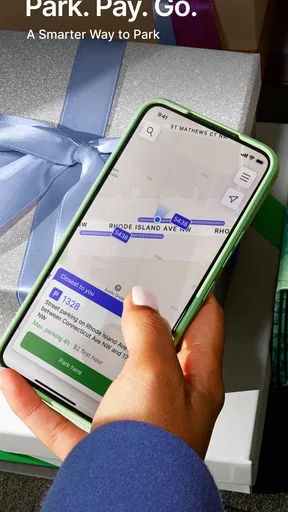
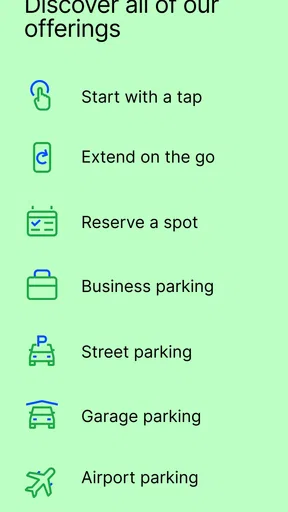
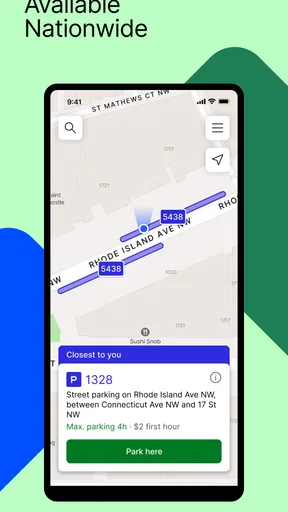
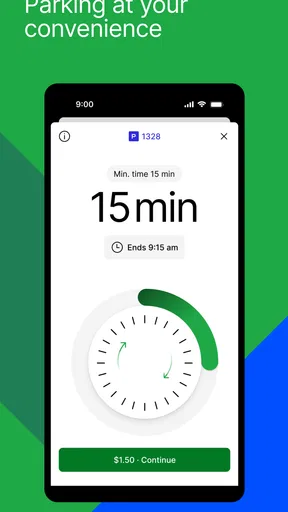
 Analysis by AppCompare
When I’m heading somewhere unfamiliar, I’d rather spend my attention on the trip than on guessing where I can leave the car. ParkMobile: Park. Pay. Go. is designed to bring the search and payment steps together, and that can make a real difference when parking is the last thing I want to sort out. The key is to treat it as a useful tool for certain parking situations, not as a guarantee that every destination will have a space available through the app.
Where the app fits into a parking routine
ParkMobile is a free parking app from Parkmobile, LLC, in the Auto & Vehicles category. It has an average rating of 4.4 from around 83,000 ratings, and it has been installed over 10 million times. Those figures suggest it is a familiar option for many drivers, but the practical question is whether the locations and payment methods it supports match the places you actually go.
I find the app most useful when I already know that a destination has parking options I can search for or pay for through it. Before setting off, I can look up the area, compare the displayed choices, and decide whether it makes sense to use the app or make another plan. That small check is more valuable than opening a parking app only after I have reached a busy street and feel pressured to choose quickly.
A realistic example is a weekday appointment downtown. I would search before leaving, compare the options shown for the destination, and keep the location details in mind as I drive in. Once parked, I would check the selected location and the parking details on screen before paying. That last pause matters: a map pin can get me close, but I still need to make sure I have selected the right place for the car I left and the parking session I intend to start.
A calmer start, with a little preparation
The app is easier to use if I do the administrative work before I am in a hurry. Registering, adding vehicle information, and setting up a payment method are straightforward steps, but they are annoying distractions when I am standing beside a car, trying to read a sign, or watching traffic. I would get those basics ready at home and then check that the vehicle details are still right when I switch cars.
That is particularly useful for households with more than one vehicle. A saved vehicle can reduce repeated typing, but it also creates a simple source of error if I tap the wrong one before starting a session. My habit would be to match the selected vehicle to the car I am in before confirming payment, rather than assuming the app has guessed correctly. The same check is worthwhile if someone else uses the phone or account.
For a first visit, I would also avoid relying on a saved favorite without checking its details. A place that was convenient last time may not suit today’s destination, timing, or walking route. Favorites are best treated as shortcuts to options I already recognize, not as automatic recommendations that remove the need to look at the current map and parking instructions.
Worth Reading Before You Choose

Flipboard Shows What News Apps Must Do Beyond the Feed

Switching to Android Auto Means Rethinking Your Driving Routine

Google Calendar Makes a Crowded Week Easier to Manage

Ludo King Makes the Most of the Minutes Between Plans

Baby Panda World Brings Quick Play to Modern Phones, but Its Game Library Feels Busy

ESPN’s Live Game View Makes Following Close Games Easier
Using ParkMobile with confidence
I use this section to focus on the checks that make a phone-based parking routine dependable: matching the vehicle and location, then confirming the session before walking away. That extra pause is especially useful when several parking areas sit close together or I’m arriving somewhere new. From there, the next section turns those checks into repeatable habits that can make familiar trips quicker without relying on assumptions.
Getting Started with Ease
First things first, downloading and setting up ParkMobile is a breeze. Available on both Android and iOS, the app walks you through a straightforward registration process. You’ll need to input some basic details, like your vehicle info and payment method. Seriously, it’s so user-friendly that even my tech-averse uncle could handle it without breaking a sweat.
Finding a Spot
The core feature of this app is finding parking spots, and it does this remarkably well. Once you input your destination, voilà, a map pops up with available parking locations. You can filter options based on price and distance, which is super handy when you're in a rush. I tried it out in a bustling downtown area, and it guided me to a spot without any hiccups.
Seamless Payment Options
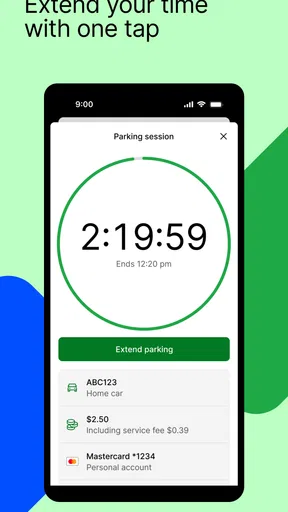
Now, let’s talk payments. One of the app's standout features is its ability to let you pay for parking directly from your phone. No more fumbling for cash or battling with unresponsive parking meters. You can even extend your parking time remotely, which is a lifesaver when those coffee breaks run longer than expected. Convenience is definitely the name of the game here.
Remote extensions are most helpful when the parking location and its rules allow one and I know I need more time. I would still check the session in the app rather than assume a payment continues automatically, and I would not wait until the last moment to decide whether an extension is possible. The app can make payment less fiddly, but it cannot make a time limit or local restriction disappear.
Settings and habits that prevent mistakes
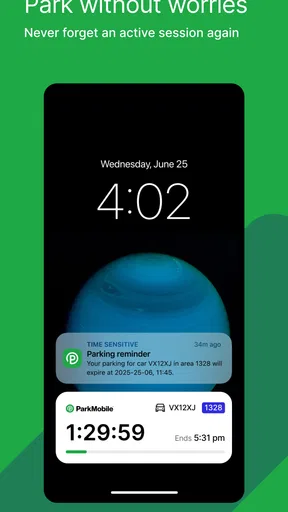
The best settings to review are the ones that affect a real parking session: vehicle selection, payment setup, and notifications. I would make sure reminders are enabled if I tend to lose track of time, then pay attention to the time and location shown when a session begins. A notification is a prompt to act, not proof that I can safely ignore posted signs or leave the car wherever the map first led me.
One useful habit is to take a moment after parking to compare the selected location in the app with the information at the space or nearby sign. This catches the kind of mismatch that can happen when several parking areas sit close together. I would also keep the confirmation visible until I am satisfied that the session is for the right vehicle and location. It adds a few seconds, but those seconds are cheaper than discovering a mistake after walking away.
Another practical pattern is to search while stopped before arriving, then make the final selection only after I can verify where I have parked. Searching early helps me compare distance and price without rushing; confirming later helps avoid paying for a nearby option that is not actually the one I used. I would never interact with the phone while driving, and a passenger can handle the search if a decision needs to be made on the way.
Faster patterns for repeat visits
For places I visit often, saved favorites and remembered routines can reduce the number of steps. I can keep familiar options easy to find, but I would still check the current details each time rather than assume yesterday’s choice remains suitable. The useful shortcut is not blind repetition; it is knowing where to start looking and what details deserve a fresh check.
If I regularly park for appointments, I would build a small routine around the app: search the destination before leaving, identify a backup option, and confirm the session once the car is parked. Having a second choice in mind is especially helpful if the first location is full or the walk is longer than expected. This does not guarantee a space, but it prevents the map from becoming my only plan when conditions on the street differ from what I hoped.
Price and distance filters also work best when I decide what matters before scanning the map. For a quick errand, the closest option may be worth more than a small saving; for a longer visit, I might accept a farther walk if the displayed price makes sense. Choosing a priority first keeps me from endlessly comparing options while blocking a busy curb or holding up someone waiting behind me.
Where convenience has limits
A parking app is only as helpful as the options relevant to the place I am visiting. If I cannot find a suitable location in the search, or if the available choices do not match the signs and spaces on the street, I would use the local payment method or find another legal option instead. A physical meter, posted instructions, or a venue’s own parking guidance can be the better source for a particular location.
That is the main trade-off compared with paying at a meter: the app can keep payment and session management on the phone, but it asks me to prepare an account and verify several details. A meter may be simpler for a one-off stop, especially if I have no interest in setting up an account. On the other hand, for recurring app-supported parking, having vehicle and payment information ready can make starting a session less cumbersome.
I would also avoid treating the map as a live promise that a space will be waiting. Search results help me assess options, but arriving conditions can change, and I still need to obey signs and confirm the exact parking area. If I need guaranteed parking for a time-sensitive event, I would look for a reservation option that clearly suits that need or arrange a different plan rather than assume a standard search guarantees availability.
Who will get the most from it
This is a good fit for drivers who often park in areas where ParkMobile is accepted, prefer paying by phone, and value being able to manage a session without returning to a meter. It is also useful for people who visit the same places repeatedly: saved favorites, vehicle details, and reminders can support a repeatable routine once the account is set up.
It is less compelling for someone who parks only occasionally in places with straightforward pay-and-display meters, or for a driver who does not want to enter vehicle and payment details into an app. It may also be the wrong first choice when the destination has its own parking process or when a particular space’s posted instructions point elsewhere. I would use the app where it simplifies the actual location, not out of habit when another method is clearer.
User Interface and Experience
The interface is clean and intuitive, making navigation a walk in the park—pun intended. The map is easy to read, and the icons are self-explanatory. I didn’t encounter any lag or glitches, which is a huge plus. It’s clear that the developers put a lot of thought into making the app as user-friendly as possible.
Extra Features Worth Mentioning
Besides the basics, ParkMobile also offers some neat extras. You can bookmark your favorite parking spots for future reference, and there’s even an option to set up notifications so you won’t forget to feed the meter. The app also supports multiple vehicles, which is great if you’re a two-car household.
For someone deciding whether to install it, the basics are appealing without making the app essential for every driver. It is free, rated for Everyone, and its current version is 25.50.4; it runs on Android 6.0 or later. It first appeared on November 28, 2011, so it has been around long enough to become a familiar name in mobile parking. I would still judge it by whether it supports the parking areas I use, because broad familiarity does not make every location or visit the same.
A practical verdict for everyday parking
My strongest recommendation is to make ParkMobile part of a parking routine rather than a last-second rescue. Set up the account before a trip, keep vehicle details current, search while safely stopped, verify the selected location after parking, and use reminders as prompts to check your session. Those small habits make the app more useful and reduce the avoidable errors that can undermine a convenient payment method.
In a nutshell, ParkMobile: Park. Pay. Go. is a solid choice for anyone looking to make parking less of a headache. It's packed with features that make the whole process smoother and quicker. Give it a try next time you're out and about—it might just save you from a parking ticket or two!
Pros
- User-friendly interface enhances ease of use.
- Wide availability in major cities nationwide.
- Secure payment options with multiple methods.
- Real-time parking spot availability updates.
- Loyalty rewards for frequent users.
Cons
- Limited coverage in smaller towns.
- Occasional app crashes reported by users.
- Some features require premium subscription.
- GPS navigation can be inaccurate at times.
- Customer service response times vary.
FAQs for ParkMobile: Park. Pay. Go.
What is ParkMobile and how does it work?
ParkMobile is a mobile app that simplifies the parking process by allowing users to find and reserve parking spaces in advance. Once you download the app, you can search for available parking spots in your area, compare prices, and secure your spot with a few taps. Payment is handled through the app, eliminating the need for cash or cards on-site.
Is ParkMobile available in all cities?
ParkMobile is widely available across many cities in the United States and continues to expand its reach. However, coverage can vary depending on the city and parking facilities. It's best to check the app or the ParkMobile website to confirm availability in your area before downloading.
How secure is my payment information on ParkMobile?
ParkMobile uses advanced security measures to protect your payment information. All transactions are encrypted, and the app complies with industry standards for data protection. Users can feel confident that their financial details are secure while using the app to pay for parking.
Are there any additional fees when using ParkMobile?
While ParkMobile does charge a convenience fee for its services, the amount can vary based on location and parking facility. This fee is generally small and is applied to cover transaction processing and maintenance costs. Users will see the total cost, including any fees, before confirming their booking.
Can I extend my parking time using ParkMobile?
Yes, ParkMobile allows you to extend your parking session directly from the app, subject to availability. This feature provides flexibility and convenience, as you can adjust your parking time without needing to return to your vehicle. Just ensure your parking spot allows extensions and make any changes before your session expires.


